Limited Time Offer!
For Less Than the Cost of a Starbucks Coffee, Access All DevOpsSchool Videos on YouTube Unlimitedly.
Master DevOps, SRE, DevSecOps Skills!
In fast-paced development and production environments, where code integrity and stability are paramount, Git has become the backbone for version control and collaborative workflows. However, as powerful as Git is, its complexities can lead to issues that interrupt workflows and potentially compromise production stability. Advanced Git troubleshooting is a vital skill, especially for those managing production servers and large codebases, as it enables swift resolution of problems that could otherwise cause significant delays or errors.
This guide is crafted to provide a comprehensive, step-by-step approach to solving advanced Git issues, empowering you with actionable insights and techniques. By learning how to handle complex scenarios such as merge conflicts, history rewriting, large file management, and corrupted object errors, you’ll be prepared to address unexpected obstacles quickly and efficiently. Each section offers detailed instructions, practical tips, and best practices tailored to save time and reduce potential risks to your production codebase.
Whether you’re facing frequent authentication prompts, need to revert a critical pushed commit, or are stuck with detached HEAD states, this troubleshooting guide will serve as a hands-on reference to help you tackle issues with confidence. Mastering these troubleshooting techniques will not only streamline your workflow but also contribute to more resilient and well-maintained code. With this guide, you’ll be well-equipped to safeguard your production environment and ensure a smoother, faster deployment process, minimizing the impact of errors on your team and end-users alike.
What are the Git Troubleshooting Advance Guides?
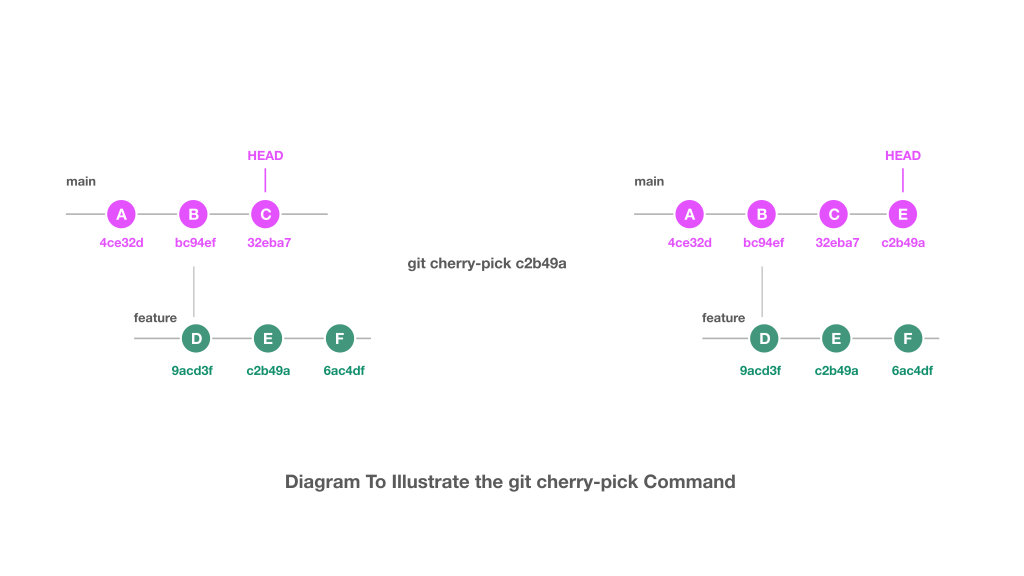
1. Resolving Merge Conflicts
When merging branches, conflicting changes may arise if modifications occur in the same part of a file on both branches.
- Identify Conflicts: Run
git statusafter a merge attempt to see which files contain conflicts. - Conflict Markers: Open conflicted files to see conflict markers:
<<<<<<< HEAD: Marks your current branch changes.=======: Separates the two conflicting changes.>>>>>>> branch-name: Marks incoming changes from the branch you’re merging.
- Resolve Conflicts: Edit the file to keep only the desired changes. You may:
- Accept incoming changes.
- Keep the current branch’s version.
- Combine both versions manually if both are relevant.
- Mark Resolved and Commit:
- Run
git add <file>after resolving. - Complete the merge with
git commit.
- Run
Pro Tip: For large-scale conflict resolution, consider git mergetool, which can automatically launch a diff tool like vimdiff or meld.
2. Reverting a Pushed Commit
Reverting allows you to safely undo changes by creating a new commit rather than altering commit history. This is especially useful in collaborative projects.
- Reverting a Single Commit: Use
git revert <commit_hash>. This creates a new commit that undoes the specified commit without modifying history. - Reverting Multiple Commits: Use
git revert <start_commit>..<end_commit>to undo a range. - Pushing Changes: Push the changes with
git push origin branch-name. - Force Push (Last Resort): If necessary, use
git push origin branch --force, but only if you’re certain that teammates are aware to avoid conflicting histories.
Pro Tip: For situations requiring a complete reset, consider git reset --hard <commit_hash>, but be mindful that this is a destructive action and should be used carefully.
3. Stuck in Detached HEAD State
A detached HEAD occurs when you check out a specific commit instead of a branch, leaving you in a “no branch” state.
- Identify Detached HEAD: Run
git statusto confirm. - Create a Branch: Use
git switch -c <new_branch>(orgit checkout -b <new_branch>for older Git versions) to save your work in a new branch. - Reattach HEAD: Switch back to a branch with
git switch mainorgit checkout main.
Pro Tip: If you made changes in detached HEAD state and want to keep them, create a new branch before switching.
4. Resolving ‘Repository Not Found’ Errors
This error usually appears when the repository URL is incorrect or credentials are missing.
- Verify Remote URL: Use
git remote -vto check the remote URL. - Update URL: Run
git remote set-url origin <new_url>if the URL is incorrect. - Credential Issues: Delete any old credentials and reauthenticate. For SSH keys, ensure the correct key is added with
ssh-add ~/.ssh/id_rsa.
Pro Tip: When using SSH URLs, check that your SSH key is added to your Git hosting service (e.g., GitHub, GitLab).
5. Handling Large Files and History Rewriting
Large files can slow down cloning and history operations. Removing them from Git history is essential to optimize performance.
- Identify Large Files: Run
git rev-list --objects --all | sort -k 2 | cut -f 2- | uniq -dto find large files. - Remove from History: Use
git filter-repo --path <file> --invert-pathsto delete large files from history. - Force Push: Push the cleaned history with
git push origin --force.
Pro Tip: For future handling of large files, consider using Git LFS (Large File Storage) which helps manage files outside the main Git history.
6. Recovering Deleted Branches
Accidentally deleted branches can be recovered by identifying the commit history and recreating the branch.
- Locate Commits: Use
git reflogto review recent actions and identify where the deleted branch pointed. - Recreate Branch: Run
git checkout -b <branch_name> <commit_hash>using the commit hash found inreflog.
Pro Tip: git reflog maintains a history of all operations, which can help in recovering lost commits and branches.
7. Undoing Local Changes
Git offers multiple ways to discard changes depending on whether they are staged or unstaged.
- Unstaged Changes: Run
git restore <file>to discard changes from the working directory without affecting the staged area. - Staged Changes: Run
git reset HEAD <file>to unstage a file but keep the changes in the working directory. - Hard Reset: For a complete reset, use
git reset --hard <commit_hash>to reset both the working directory and staging area.
Pro Tip: Avoid using --hard without double-checking, as it permanently discards changes.
8. Tracking Down Unexpected Changes
Use Git’s powerful history and diff commands to identify the source of unexpected code changes.
- List Commits: Run
git log --onelinefor a quick view of recent commits. - Identify Line Changes: Use
git blame <file>to view who changed each line and when. - Compare Branch Differences:
git diff main feature-branchshows changes between two branches.
Pro Tip: Use git bisect for more complex tracking when you’re unsure which commit introduced a bug.
9. Avoiding Frequent Authentication Prompts
To simplify workflows, Git offers credential caching to avoid repeated logins.
- Cache Credentials: Use
git config --global credential.helper cacheto store credentials temporarily. - Adjust Cache Duration: Set a specific timeout with
git config --global credential.helper 'cache --timeout=3600'for 1-hour sessions.
Pro Tip: Use credential managers (e.g., GitHub CLI) for more secure and efficient handling of credentials.
10. Solving Corrupt Object Errors
Corrupt objects may cause issues when pushing, pulling, or working with history.
- Identify Corrupt Objects: Run
git fsckto identify and locate corrupt objects. - Restore from Backup: If available, replace the corrupt object from a backup.
- Clean Unreachable Objects: Run
git pruneto delete objects unreachable from any branch, andgit repack -a -dto repack the repository.
Pro Tip: Back up your .git directory regularly, especially for critical projects.
11. Fixing Upstream Rejection Errors
These occur when local changes conflict with updates on the remote branch.
- Non-Fast-Forward Rejections: Usually due to outdated local branches; use
git fetch origin && git rebase origin/mainto sync. - Force Push (Caution): If all else fails, you may need
git push origin branch-name --force, but avoid this if possible to prevent overwriting teammates’ changes.
Pro Tip: Use git pull --rebase regularly to avoid complex merges and keep branches in sync.
Why Git Troubleshooting is Important?
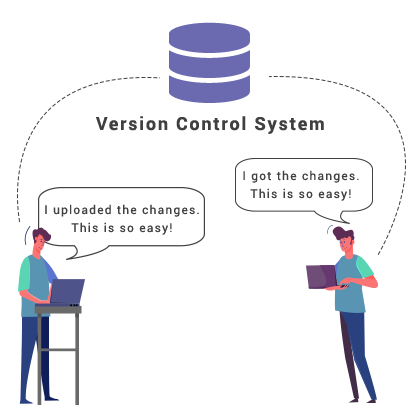
Git is an essential tool in modern development, enabling version control, collaboration, and efficient project management across development teams. However, as codebases grow and workflows become more complex, issues with Git can arise that interrupt productivity, delay deployments, and sometimes even introduce bugs into production. Effective troubleshooting of Git issues is crucial because it ensures that teams can quickly identify, understand, and resolve problems, safeguarding both the stability of the code and the efficiency of the development pipeline.
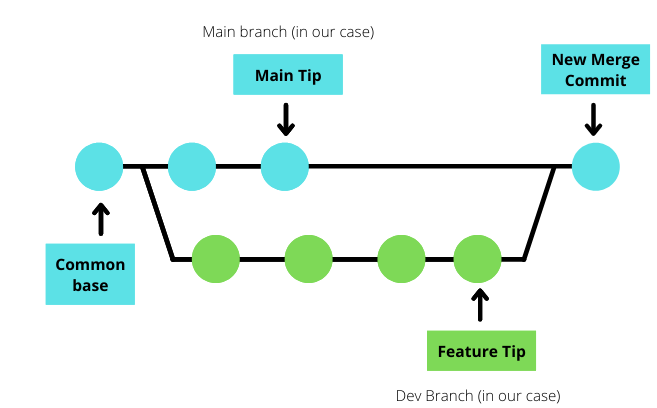
Here are some key reasons why Git troubleshooting skills are vital, especially in production environments:
1. Minimizes Downtime and Productivity Loss
- When Git issues arise, they can halt development workflows, especially when they involve branch conflicts, history divergence, or unmerged code. Downtime in production environments or development bottlenecks due to unresolved Git issues can significantly delay critical updates and deployments. With advanced troubleshooting skills, developers can resolve these issues swiftly, reducing downtime and keeping the project moving.
2. Prevents Errors in Production
- Production systems demand stability, and Git-related errors, if left unchecked, can inadvertently introduce bugs, regressions, or unwanted changes. For instance, mistakenly merging an incorrect branch or failing to resolve merge conflicts properly can lead to unintended code going live. Troubleshooting Git effectively helps ensure that only intended, tested, and stable code reaches production, reducing the risk of errors.
3. Enhances Collaboration and Communication
- Teams rely on Git for collaboration, and problems such as merge conflicts, non-fast-forward errors, or diverging histories can hinder collaboration and confuse contributors. By troubleshooting these issues promptly and effectively, developers maintain a smooth workflow that facilitates teamwork. It also allows for clearer communication of changes, especially when multiple branches and contributors are involved.
4. Safeguards Code Integrity and History
- Code history and integrity are fundamental to a healthy codebase. Git troubleshooting techniques like managing merge conflicts, recovering deleted branches, and resolving corrupt objects help protect the continuity and reliability of the codebase. By maintaining a clean history and avoiding unnecessary force pushes or resets, developers ensure that the codebase remains robust, accurate, and traceable.
5. Increases Efficiency in Complex Workflows
- In large projects with numerous contributors, complex branching strategies, and frequent releases, Git issues can escalate quickly, causing confusion and backtracking. Efficient troubleshooting practices, such as resolving merge conflicts, reverting commits, or managing large files, empower developers to handle these complexities without compromising on speed or quality. This skill enables a more streamlined workflow, allowing for faster and more reliable deployments.
6. Builds Confidence in Production Management
- For developers working in production, where stability is non-negotiable, the ability to troubleshoot Git issues is a confidence booster. Knowing that any Git issue can be resolved, from detached HEAD states to upstream rejections, enables teams to deploy with greater assurance, minimizing risks associated with last-minute issues or emergency fixes.